


Description
Payment & Security

Your payment information is processed securely. We do not store credit card details nor have access to your credit card information.
Great Prices Everyday
Australian Family Owned
Need help?


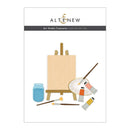
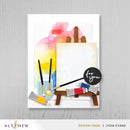
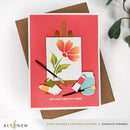
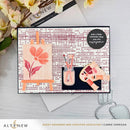
Bring the joy of creating art into your paper crafts with the Art Studio Treasures Die Set. This charming collection lets you build a miniature layered art studio scene featuring an easel, canvas, artist palette, brushes, paint tubes, and more.
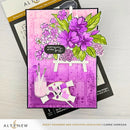
Each die includes layered and debossed details to add realistic texture and dimension, making it easy to create a beautifully detailed creative scene. Pair the tiny canvas with the Painted Petals Stencil Set to design your own floral masterpiece, perfect for adding an artistic touch to cards, scrapbook pages, journals, and other handmade projects.
Features:
Includes 12 detailed layering dies
Create a miniature art studio scene with realistic elements
Features an easel, canvas, palette, brushes, paint tubes, and jar
Layered and debossed details add texture and dimension
Perfect for creative, artistic, and handmade card designs
Ideal for card making, scrapbooking, journalling, and paper crafting
Compatible with most standard die-cutting machines (sold separately)
Tip:
Make crafting a breeze by pairing this die set with Crafty Necessities Coloured Cardstock Sets for beautifully coordinated layers.
Perfect Pairings: (all sold separately)
A Splash of Color Stamp Set
Painted Petals Stencil Set
Dynamic Duo: Painted Blossoms & Add-on Die Bundle
Die Dimensions:
Easel: 2.5" x 3.9" (6.4cm x 9.9cm)
Palette: 1.9" x 1.4" (4.8cm x 3.6cm)
Paint Tubes: 0.5" x 1.1" (1.3cm x 2.8cm)
Jar: 0.9" x 1.5" (2.3cm x 3.8cm)
Canvas: 2.2" x 2.7" (5.6cm x 6.9cm)
Round Brush: 0.1" x 2.3" (0.3cm x 5.8cm)
Flat Brush: 0.2" x 2.2" (0.5cm x 5.6cm)
Fan Brush: 0.3" x 2.1" (0.8cm x 5.3cm)
Details:
Includes: 12 dies
Collection: Art Studio Treasures
Design: Mini Art Studio Layering Die Set
Your payment information is processed securely. We do not store credit card details nor have access to your credit card information.

You have copied the placement for the Product Page.
Go back to the App Embeds section, and in the Paypal Advanced Settings, paste the copied value into the Product Page field and click the 'Save' button in the top right corner.