



Description
Payment & Security

Your payment information is processed securely. We do not store credit card details nor have access to your credit card information.
Great Prices Everyday
Australian Family Owned
Need help?


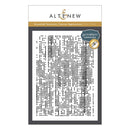
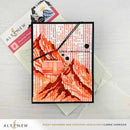
Bring the look and feel of artist canvas to your paper crafting projects with the Essential Textures: Canvas Impressions Press Plate. Featuring an organic, painterly texture, this versatile press plate adds depth, movement, and visual interest to backgrounds, mixed media designs, and layered card projects.
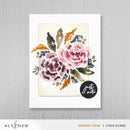
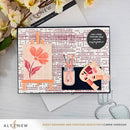
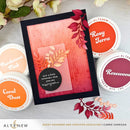
The irregular canvas-inspired texture creates an artistic foundation that beautifully complements focal images, sentiments, and embellishments. Use it with ink for a classic letterpress effect or add hot foil for a touch of shimmer and dimension.
Features:
Creates a realistic canvas-inspired texture
Adds depth and painterly movement to backgrounds
Perfect for mixed media, card making, scrapbooking, and paper crafts
Ideal for layering behind focal elements
Compatible with ink and hot foil techniques
Adds elegant texture and shine to handmade projects
Press Plate Dimensions:
127mm x 177.8mm (5" x 7" / 12.7cm x 17.8cm)
Compatible With:
Spellbinders BetterPress Letterpress System (sold separately)
How to Use:
Place the press plate onto the Chase (the magnetic platform that holds the plate securely).
Secure your cardstock panel onto the Platen using low-tack tape.
Apply ink evenly across the raised surface of the press plate.
Create your letterpress sandwich and run it through your manual die-cutting machine for crisp, professional results.
Hot Foil Tip:
This press plate can also be used with hot foil to add instant texture, shine, and dimension. Explore different foil colours to create everything from elegant metallic finishes to bold, colourful effects.
Details:
Collection: Essential Textures
Design: Canvas Impressions Press Plate
Includes: 1 press plate
Your payment information is processed securely. We do not store credit card details nor have access to your credit card information.

You have copied the placement for the Product Page.
Go back to the App Embeds section, and in the Paypal Advanced Settings, paste the copied value into the Product Page field and click the 'Save' button in the top right corner.