




Description
Payment & Security

Your payment information is processed securely. We do not store credit card details nor have access to your credit card information.
Great Prices Everyday
Australian Family Owned
Need help?


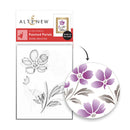
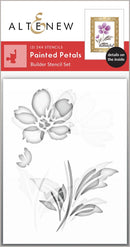
Create beautifully artistic floral designs with the Painted Petals Stencil Set. Featuring three soft, watercolour-inspired bloom silhouettes, this stencil set adds a hand-painted look to your projects with organic, brushstroke-style edges and flowing floral shapes.
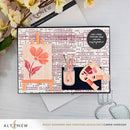
Use inks, sprays, or texture pastes to build expressive floral backgrounds and layered designs full of depth and movement. Pair it with the Art Studio Treasures Die Set to create a miniature floral masterpiece on the included canvas for an extra creative touch.
Features:
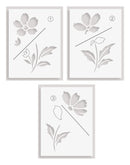
Includes 3 floral stencil designs with a soft painted effect
Watercolour-inspired blooms with natural brushstroke edges
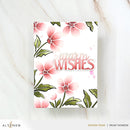
Create layered floral backgrounds with depth and movement
Works beautifully with inks, sprays, and texture pastes
Perfect for card making, scrapbooking, journalling, and mixed media projects
Reusable and easy to clean
Stencil Size:
3" x 4" (7.6cm x 10.2cm)
Perfect Pairings: (all sold separately)
Art Studio Treasures Die Set
Fancy Miss You Die
Regal Frame Die Set
Stencil Tips & Care:
To Use:
Secure the stencil with washi tape or painter's tape.
Blend ink, spray mist, or apply texture paste through the stencil design.
Gently lift the stencil to reveal your finished design.
To Clean:
Wipe with a baby wipe or stamp cleaner after use.
For deeper cleaning, wash with mild soap and lukewarm water.
Dry completely and store flat, away from heat and direct sunlight.
Details:
Includes: 3 reusable stencils
Collection: Painted Petals
Design: Stencil Set
Your payment information is processed securely. We do not store credit card details nor have access to your credit card information.

You have copied the placement for the Product Page.
Go back to the App Embeds section, and in the Paypal Advanced Settings, paste the copied value into the Product Page field and click the 'Save' button in the top right corner.