


Description
Payment & Security

Your payment information is processed securely. We do not store credit card details nor have access to your credit card information.
Great Prices Everyday
Need help?


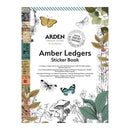
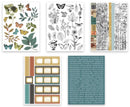
Add vintage-inspired detail and creative versatility to your projects with the Arden Creative Studio Amber Ledgers Sticker Book, designed by Katie Pertiet. This beautifully curated collection includes 137 kiss-cut stickers arranged across 10 glue-bound sheets, with 5 unique page designs included twice: once on clear matte PET and once on washi-style paper.
Inside, discover a rich variety of Amber Ledgers designs, including botanicals and butterflies in warm vintage-inspired tones, monochrome sketch-style foliage ready to customise with your own colour, versatile film strip elements, expressive sentiments and decorative strips in varying widths. The mix of designs makes it easy to create borders, layers, focal points and finishing touches.
The clear matte PET stickers can be customised with alcohol inks, markers or pens, allowing you to coordinate them with your project. Easy to peel and apply, these stickers are perfect for journals, scrapbook layouts, cards, planners, mixed media and other papercraft projects.
Features:
137 kiss-cut sticker designs
10 glue-bound sheets
5 unique page designs, 2 of each
Clear matte PET and washi-style paper stickers
Vintage botanicals, butterflies and sketch-style foliage
Film strips, sentiments and decorative strips
Clear PET stickers can be customised with alcohol inks, markers or pens
Easy to peel and apply
Designed by Katie Pertiet
Part of the Amber Ledgers Collection
Details:
Total sheets: 10
Material: Clear matte PET and washi-style paper
Sticker type: Kiss-cut
Total designs: 137
Your payment information is processed securely. We do not store credit card details nor have access to your credit card information.
