

Description
Payment & Security

Your payment information is processed securely. We do not store credit card details nor have access to your credit card information.
Great Prices Everyday
Need help?


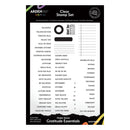
Celebrate autumn, gratitude and everyday moments with the Arden Creative Studio Maker Series Gratitude Essentials Clear Stamp Set, designed by Katie Pertiet. This comprehensive collection includes 62 clear photopolymer stamps featuring a versatile selection of fall-inspired sentiments, phrases, autumn months and weekdays.
Use the words and phrases to create meaningful headings, document special moments, build daily planner spreads or add thoughtful finishing touches to journals and memory keeping projects. With both decorative and practical elements, this set is perfect for creating seasonal layouts and gratitude journals.
The stamps provide crisp, clean impressions and precise placement, making them ideal for layering with inks and other mediums. The set also coordinates with the Arden Creative Studio Maker Series Everyday Elements Craft Die Set (sold separately), allowing you to cut out stamped sentiments for added dimension.
Features:
62 clear photopolymer stamps
Autumn and gratitude-inspired sentiments and phrases
Includes autumn months and weekdays
Perfect for planners, journals and memory keeping
Ideal for scrapbook pages, cards and seasonal layouts
Create headings, labels and decorative details
Crisp impressions and precise placement
Great for layering with inks and other mediums
Coordinates with Everyday Elements Craft Die Set (sold separately)
Designed by Katie Pertiet
Details:
Product: Arden Creative Studio Maker Series Clear Stamp Set - Gratitude Essentials
Collection: Maker Series
Design: Gratitude Essentials
Quantity: 62 stamps
Size: 6" x 8" (15.2cm x 20.3cm)
Material: Clear photopolymer
Designed By: Katie Pertiet
Your payment information is processed securely. We do not store credit card details nor have access to your credit card information.
