


Description
Payment & Security

Your payment information is processed securely. We do not store credit card details nor have access to your credit card information.
Great Prices Everyday
Need help?


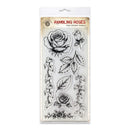
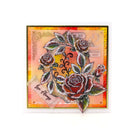
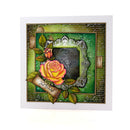
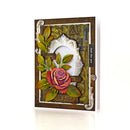
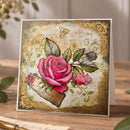
Create beautiful botanical designs with the Cosmic Shimmer Rambling Roses DL Stamp Set. This versatile collection features detailed roses, rosebuds, leaves and trailing foliage, along with a decorative floral border for creating elegant floral arrangements and layered botanical designs.
With eight deep-etched clear photopolymer stamps, you can mix and match individual blooms, leaves and trailing stems or use the decorative rose border for a striking finishing touch. The intricate designs are ideal for colouring with inks, alcohol markers, watercolours and pencils.
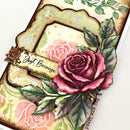
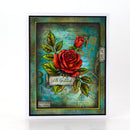
Perfect for card making, papercraft, mixed media, art journaling, scrapbooking and home décor projects. The clear stamps are easy to position and can be used with acrylic blocks and stamping platforms.
Designed and made in the UK.
Features:
Eight detailed clear photopolymer stamps
Includes roses, rosebud, leaves and trailing foliage
Decorative rose border stamp
Deep-etched photopolymer for detailed impressions
Clear design for easy positioning
Suitable for colouring with inks, alcohol markers, watercolours and pencils
Compatible with acrylic blocks and stamping platforms
Perfect for card making, papercraft, mixed media, art journaling and scrapbooking
Designed and made in the UK
Details:
Product: Cosmic Shimmer Rambling Roses DL Stamp Set
Quantity: 8 stamps
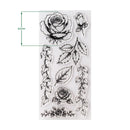
Overall Mounted Size: 99mm x 210mm
Main Rose Stamp Height: 62mm
Material: Deep-etched clear photopolymer
Use With: Acrylic blocks and stamping platforms
Packaging: Acetate sheet
Your payment information is processed securely. We do not store credit card details nor have access to your credit card information.

You have copied the placement for the Product Page.
Go back to the App Embeds section, and in the Paypal Advanced Settings, paste the copied value into the Product Page field and click the 'Save' button in the top right corner.