


Description
Payment & Security

Your payment information is processed securely. We do not store credit card details nor have access to your credit card information.
Great Prices Everyday
Need help?


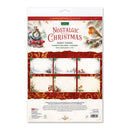
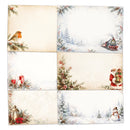
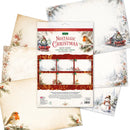
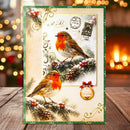
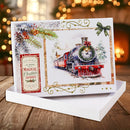
Complete your festive card making projects with Katy Sue Nostalgic Christmas Insert Papers. This pack contains 18 beautifully illustrated A4 inserts featuring six charming Christmas designs, with three sheets of each design.
The vintage-inspired artwork includes traditional robins, a magical Christmas train, Santa Claus with presents, a cosy glowing lantern and a peaceful snow-covered woodland scene featuring a cheerful snowman. Each design adds a warm, nostalgic touch to the inside of your handmade Christmas cards.
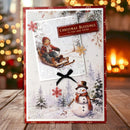
Designed to complement the Nostalgic Christmas range, these versatile papers provide plenty of space for writing your own personal message. They can also be trimmed to suit different card sizes or incorporated into other festive papercrafting projects.
Printed on high-quality 150gsm paper, these inserts make it easy to carry your chosen Christmas design through to the inside of your cards for a beautifully coordinated finish.
Proudly designed and made in the UK.
Features:
18 beautifully illustrated Christmas insert papers
6 nostalgic Christmas designs
3 sheets of each design
Vintage-inspired seasonal artwork
Includes robins, Christmas train, Santa, lantern and snowy woodland scenes
Plenty of space for personal messages
Can be trimmed to suit different card sizes
Designed to complement the Nostalgic Christmas range
Printed on high-quality 150gsm paper
Ideal for handmade Christmas cards and festive papercrafting
Details:
Quantity: 18 sheets
Designs: 6 designs, 3 sheets of each
Sheet Size: A4 (210 x 297mm)
Paper Weight: 150gsm
Type: Card insert papers
Design: Nostalgic Christmas
Use: Christmas card making, papercrafting and seasonal crafts
Your payment information is processed securely. We do not store credit card details nor have access to your credit card information.
