



Description
Payment & Security

Your payment information is processed securely. We do not store credit card details nor have access to your credit card information.
Great Prices Everyday
Need help?


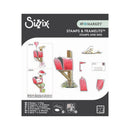
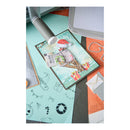
Add nostalgic charm to your handmade projects with the Sizzix Clear Stamps Set 8PK with 6PK Framelits Die Set – Letter Drop by 49 and Market. This delightful coordinating stamp and die set lets you stamp detailed mailbox images and cut them out with the matching Framelits dies for perfectly finished embellishments.
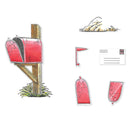
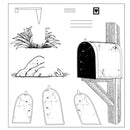
Featuring a classic mailbox mounted on a wooden post, a movable red flag, a letter, and a grassy base, this versatile set even allows you to create the mailbox in three different positions, closed, slightly open, or fully open, for added realism and storytelling.
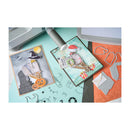
Perfect for cards, scrapbook layouts, journals, and other paper crafting projects, this set captures the timeless joy of sending and receiving letters.
Features:
Includes 8 clear stamps and 6 coordinating Framelits dies
Stamp and cut detailed mailbox-themed designs with precision
Features a mailbox, wooden post, red flag, letter, and grassy base
Create the mailbox in a closed, slightly open, or fully open position
Perfect for cards, scrapbooking, journals, memory keeping, and paper crafting projects
Coordinating dies make layering and assembly quick and easy
Compatible with most standard die-cutting machines (sold separately)
Details:
Stamp Set: 8 clear stamps
Die Set: 6 Framelits dies
Collection: Letter Drop
Designer: 49 and Market
Create heartfelt, nostalgic scenes with the Sizzix Clear Stamps & Framelits Die Set – Letter Drop by 49 and Market, perfect for adding charming postal-inspired details and interactive elements to your handmade creations.
Die: 5.08cm x 10.80cm - 2.22cm x 3.49cm
Stamp: 4.76cm x 10.48cm - 0.32cm x 0.32cm
Your payment information is processed securely. We do not store credit card details nor have access to your credit card information.
