


Description
Payment & Security

Your payment information is processed securely. We do not store credit card details nor have access to your credit card information.
Great Prices Everyday
Need help?


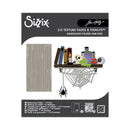
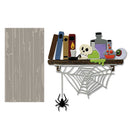
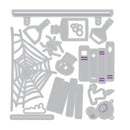
Step into a world of curious creativity with the Sizzix Thinlits Die Set 14PK & 2D Texture Fade – Vault Side-Order Laboratory by Tim Holtz. This inventive set combines a detailed embossing folder with a collection of Halloween laboratory-inspired dies, allowing you to create layered projects filled with texture, dimension, and imaginative storytelling.
Perfect for cards, journals, scrapbooking, and mixed media projects, this versatile set lets you create intricate laboratory-themed elements while adding rich tactile backgrounds with the included 2D Texture Fade embossing folder. Designed as part of the popular Vault Side-Order range, it is compact, creative, and ideal for crafting at home or on the go with the Sizzix Sidekick Machine (664175).
Features:
Includes 14 Thinlits dies
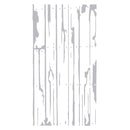
Includes 1 x 2D Texture Fade embossing folder
Halloween laboratory-inspired designs for creative storytelling
Creates detailed die-cut elements and textured backgrounds
Perfect for cards, journals, scrapbooking, mixed media, and seasonal projects
Ideal for layering, dimensional effects, and unique embellishments
Compact format designed to work beautifully with the Sizzix Sidekick Machine (664175, sold separately)
Compatible with most standard die-cutting machines (sold separately)
Details:
Die Set: Vault Side-Order Laboratory
Designer: Tim Holtz
Brand: Sizzix
Includes: 14 Thinlits dies + 1 x 2D Texture Fade embossing folder
Create curious, spooky, and imaginative projects with the Sizzix Vault Side-Order Laboratory Set by Tim Holtz, perfect for adding vintage Halloween charm, texture, and detailed storytelling to your creative work.
Your payment information is processed securely. We do not store credit card details nor have access to your credit card information.
