


Description
Payment & Security

Your payment information is processed securely. We do not store credit card details nor have access to your credit card information.
Great Prices Everyday
Need help?


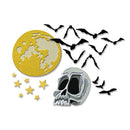
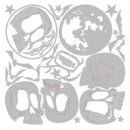
Create hauntingly atmospheric Halloween scenes with the Sizzix Thinlits Die Set 25PK – Vault Moonlight Scare by Tim Holtz. Inspired by classic Halloween nights under a glowing moon, this captivating collection features an eclectic mix of spooky and seasonal elements designed for layering, storytelling, and adding dramatic detail to your creative projects.
Featuring eerie skulls, bats in flight, moonlit accents, and other mysterious designs, this set reflects Tim Holtz’s signature vintage-inspired style with a distressed feel that brings nostalgic Halloween charm to every project.
Perfect for cards, journals, scrapbook layouts, and mixed media creations, these versatile dies make it easy to build richly layered scenes filled with spooky atmosphere and creative dimension.
Features:
Includes 25 Thinlits dies
Features Halloween-inspired designs including skulls, bats, and moonlit elements
Creates layered scenes with depth, texture, and dimension
Tim Holtz signature vintage and distressed aesthetic
Perfect for Halloween cards, journals, scrapbooking, and mixed media projects
Ideal for creating spooky backgrounds, focal points, and embellishments
Compatible with most standard die-cutting machines (sold separately)
Details:
Die Set: Vault Moonlight Scare
Designer: Tim Holtz
Brand: Sizzix
Includes: 25 dies
Bring mysterious Halloween magic to your handmade creations with the Sizzix Thinlits Die Set – Vault Moonlight Scare by Tim Holtz, perfect for crafting eerie night scenes, vintage-inspired designs, and unforgettable seasonal projects.
Your payment information is processed securely. We do not store credit card details nor have access to your credit card information.
