


Description
Payment & Security

Your payment information is processed securely. We do not store credit card details nor have access to your credit card information.
Great Prices Everyday
Need help?


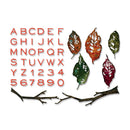
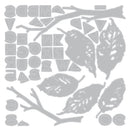
Bring natural beauty and timeless texture to your paper crafting projects with the Sizzix Thinlits Die Set 43PK – Vault Leaves + Sticks by Tim Holtz. This expansive collection features beautifully detailed botanical dies designed to capture the organic shapes of leaves, branches, and natural elements, making it perfect for creating layered designs with depth and dimension.
Ideal for cards, journals, scrapbooking, and mixed media projects, this versatile set allows you to create everything from autumn-inspired scenes to subtle botanical accents that can be used throughout the year. The included alphabet adds even more creative possibilities, allowing you to personalise your projects with custom words and sentiments.
Features:
Includes 43 Thinlits dies
Features detailed leaves, branches, sticks, and botanical elements
Includes a complete alphabet for personalised designs
Perfect for layering, framing, and adding texture and dimension
Ideal for cards, journals, scrapbooking, mixed media, and home décor projects
Great for seasonal projects or year-round nature-inspired creations
Compatible with most standard die-cutting machines (sold separately)
Details:
Die Set: Vault Leaves + Sticks
Designer: Tim Holtz
Brand: Sizzix
Includes: 43 dies
Create rich, nature-inspired designs with the Sizzix Thinlits Die Set – Vault Leaves + Sticks by Tim Holtz, a versatile collection perfect for adding organic texture, personalised details, and layered storytelling to your handmade projects.
Your payment information is processed securely. We do not store credit card details nor have access to your credit card information.
