

Description
Payment & Security

Your payment information is processed securely. We do not store credit card details nor have access to your credit card information.
Great Prices Everyday
Need help?


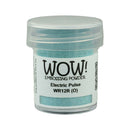
Bright, bold, and full of energy, Electric Pulse is a vibrant opaque blue embossing powder inspired by the endless blue skies of summer. This high-clarity shade delivers a cool, electric finish that adds striking contrast and a burst of colour to any creative project.
Part of the Neon Dayz Collection, Electric Pulse captures the excitement of festival season with its vivid colour and high-voltage style. Whether you're creating bold sentiments, eye-catching backgrounds, or colourful accents, this electrifying blue is designed to make your projects stand out.
Features:
Bright opaque electric blue embossing powder
High-clarity colour with bold, vibrant coverage
Opaque formula won't be affected by the colour underneath
Creates a smooth, raised finish when heat embossed
Perfect for card making, scrapbooking, journaling, mixed media, and paper crafting
Ideal for sentiments, backgrounds, borders, and decorative accents
Jar size: 15ml (0.50oz)
Opacity:
Opaque (O): Provides solid coverage that blocks light, ensuring the embossed colour remains true regardless of the surface or ink colour beneath it.
Neon Dayz Collection
Inspired by the energy of peak summer festival season, the Neon Dayz Collection celebrates sun-soaked days, vibrant colours, and unforgettable nights. These high-voltage embossing powders are designed to help your creativity shine with bold, statement-making finishes that refuse to blend in.
Bring cool, electrifying colour to your projects with Electric Pulse, the perfect embossing powder for designs that demand attention.
Your payment information is processed securely. We do not store credit card details nor have access to your credit card information.
