



Description
Payment & Security

Your payment information is processed securely. We do not store credit card details nor have access to your credit card information.
Great Prices Everyday
Australian Family Owned
Need help?



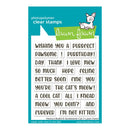
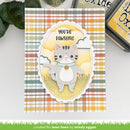
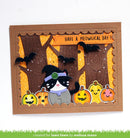
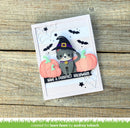
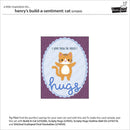
Add the perfect finishing touch to your handmade cards and papercraft projects with the Henry's Build-A-Sentiment: Cat Clear Stamps. Designed for cat-themed creations, this versatile sentiment set lets you mix and match words to create playful, heartfelt greetings for birthdays, thank you cards, get well wishes and everyday handmade keepsakes.
Made from premium photopolymer, these clear stamps produce crisp, detailed impressions with easy alignment on acrylic blocks. The solid base design makes layering and positioning simple, allowing you to build customised sentiments that pair beautifully with your favourite cat-inspired stamping projects.
Key Features
Premium clear photopolymer stamps for sharp, clean impressions.
Build custom sentiments for cat-themed cards and crafts.
Solid base design for quick and accurate alignment.
Perfect for handmade cards, scrapbook layouts, gift tags and journals.
Create phrases including "I'm not kitten, I love mew!", "Wishing you a purrfect day!" and "Hope you're feline better soon!".
Coordinates with Build-A-Cat (Sold Separately).
Coordinates with Cozy Cats (Sold Separately).
Coordinates with Happy Couples (Sold Separately).
Combine with other Henry's Build-A-Sentiment stamp sets (Sold Separately) for even more creative combinations.
Includes multiple clear photopolymer sentiment stamps.
Complete your cat-themed papercraft collection with this versatile sentiment set and create personalised handmade cards that are full of charm, personality and heartfelt messages.
Your payment information is processed securely. We do not store credit card details nor have access to your credit card information.

You have copied the placement for the Product Page.
Go back to the App Embeds section, and in the Paypal Advanced Settings, paste the copied value into the Product Page field and click the 'Save' button in the top right corner.